Category Archives: Blog

You’re on a job. Maybe you’re under a kitchen sink, or up on a roof, or halfway through a service call that’s running long. Your phone buzzes – a lead came in through your website, or your Google listing, or your Local Splash profile. You make a mental note to follow up when you’re done.

By the time you do, it’s been three hours. Sometimes that’s fine. But a lot of times, that customer has already moved on to the next name on their list.This isn’t a failure of effort. It’s a failure of systems – specifically, the gap between where leads arrive and where your actual business runs. That gap has a cost, and for most service businesses, it’s bigger than they realize.

The Real Cost of a Missed Lead

Contractors and service pros spend real money to get found online. Between your website, your Google Business Profile, and your Local Splash presence, you’ve built out a digital footprint designed to bring customers to your door. And it works to bring inquiries to you.

jobber dashboard view


The problem is what happens next. Those inquiries don’t all arrive in the same place. A form submission lands in your email. A call goes to voicemail. A message shows up in some dashboard you haven’t opened since Tuesday. By the time you piece it all together at the end of a long day, the trail has gone cold on at least one of them.

Research consistently shows that the odds of reaching a prospect drop dramatically after the first hour. After the first day, you’re essentially starting from scratch. For a plumber or an HVAC tech or a landscaping crew that’s out in the field from sunup to sundown, that window closes fast. The lead wasn’t bad; the handoff was.

This is a solvable problem. But solving it requires your lead flow and your job management to actually talk to each other.

Why Jobber Has Become the Command Center for Service Businesses

If you’re already running Jobber, you know what it does and why it works. For anyone who hasn’t come across it: Jobber is field service management software built specifically for home and local service businesses. It brings the operational side of a service business into one place with scheduling, quotes, invoicing, client records, payment collection.

Jobber caught on because it’s built for the specific rhythm of a service business. Schedule a job, dispatch a crew, send an invoice, collect payment. It’s the whole lead cycle without a lot of extra steps or a complicated interface getting in the way. A lot of contractors who adopt Jobber describe it the same way: they can’t imagine running things without it anymore.

The thing Jobber is very good at is managing jobs you already have. Customers in the system, work orders assigned, invoices sent. Where it depends on you is getting the lead into the system in the first place. That’s historically been a manual step, and manual steps are where things fall through.

Your Local Splash Leads, Now Living in Jobber

jobber phone send text


That manual step is now gone.

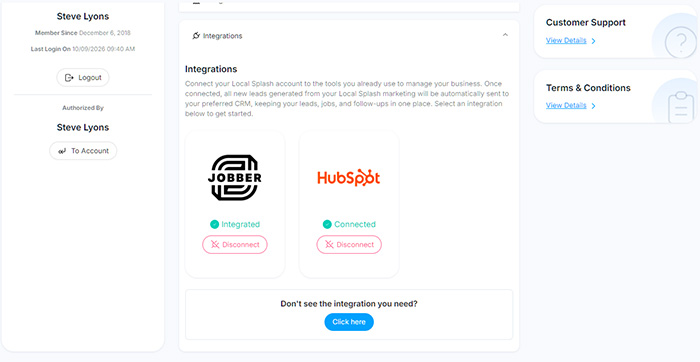
Local Splash has launched its first native integration, and Jobber is where it starts. When a lead comes through your Local Splash profile, it syncs automatically into Jobber. No copying. No forwarding. No logging into two platforms and hoping you got everything. The lead shows up where your business already lives, ready to act on.

Setting it up takes a few minutes. Log into your Local Splash dashboard at my.localsplash.com, then navigate to Account Settings / Integrations / Jobber / Integrate. Follow the prompts to connect your accounts, and that’s it. From that point forward, your Local Splash leads flow into Jobber automatically.

For existing clients, this is one of those features you’ll wonder how you got along without. For anyone considering Local Splash, this is part of what you’re getting. It’s not just lead generation. It’s lead delivery into a system you’re already using.

Faster Response Times Win More Jobs

There’s a stat that gets cited a lot in sales circles: your odds of actually reaching a new lead drop by roughly 80 percent if you wait longer than five minutes to respond. Five minutes. For a contractor who’s elbow-deep in a job, that number can feel discouraging but it’s also clarifying.

The problem was never a lack of desire to have more leads. Lead flow was limited by the tools being used.
In Jobber, when a new inquiry lands, your phone can notify you the same way it would a text message. You glance at it, you know exactly who it is and what they need, and you can fire off a quick reply before you even put your tools down.

That’s not a minor convenience. It’s the difference between being first on the callback list and being an afterthought.

The follow-up piece matters too. Jobber lets you schedule follow-up tasks, track where each prospect stands, and make sure nobody slips out of your pipeline quietly. A lead that came in on a busy Tuesday doesn’t get forgotten by Thursday. Over the course of a month, that kind of discipline is worth several jobs. Over the course of a year, it adds up to real revenue.

This Is Just the Start

The Jobber integration is the first in what Local Splash is building out as a broader integration roadmap. More providers are coming.

That might sound like a small detail, but it points to something worth paying attention to. Local Splash has long helped service businesses get found online — rankings, visibility, lead generation. What’s taking shape now is a platform that doesn’t just deliver leads but connects them to the tools and workflows where your business actually operates.

The goal is straightforward: your Local Splash presence should do more than generate inquiries. It should feed directly into how you run your business. The Jobber integration is the first step in making that real.

If you’ve been curious about what Local Splash looks like when it’s working fully in your favor, this is a good time to take a closer look.

Ready to Connect Your Accounts?

Already a Local Splash client: Log in at my.localsplash.com, go to Account Settings / Integrations / Jobber / Integrate, and get connected today. If you run into anything, our support team is there.

Not yet a client: This is the kind of infrastructure Local Splash is building — lead generation that connects directly to the tools you already use. Let’s talk about what that looks like for your business.
jobber integration local splash


For years, home service businesses across the U.S. have relied on Google’s trust badges to set themselves apart in the Google Guaranteed Ads platform. You’ve probably seen or even promoted the familiar “Google Guaranteed” badge. This was a green checkmark that told potential customers your business had passed Google’s screening process. 

The Google money-back guarantee provided customers with protection and reimbursement up to $2,000 when their service expectations were not met.

Google will introduce substantial changes to its system starting in October 2025. The company is rolling all of its existing trust badges into a single new designation: Google Verified. This new badge will replace Google Guaranteed, Google Screened, License Verified by Google, and the Money Back Guarantee.

Removing the Money Back Guarantee from Google Verified Ads can be seen as a positive step for local service providers. Simplifying the various trust programs will make it easier for customers to recognize verified, high-quality businesses like yours at a glance.

Visual graphic showing Google Guaranteed, Google Screened, License Verified by Google, and Money Back Guarantee programs merging into one unified Google Verified badge.

From Legacy Badges to Google Verified: A Unified Approach

Google launched these programs to establish trust with customers who wanted to book local services through their online platform. The Google Guaranteed badge provided homeowners with assurance that a plumber or HVAC technician had been verified and was backed by a limited guarantee. 

The Google Screened badge was tailored to professional services like attorneys and financial advisors. Now, the new Google Verified badge consolidates these various programs into one, focused more on home service providers. License Verified by Google was used in specific industries where a license was the primary trust signal (for example, real estate). And the Money Back Guarantee tied into the Guaranteed program as an added consumer protection.

The multiple programs which Google operated over time were simply too complicated. The different trust badges created customer confusion because they failed to explain the distinction between “Screened” and “Guaranteed” and the reimbursement process. The company unifies all four programs into a new single standard (Google Verified) that makes things simpler for you and your customers.

The new badge will show directly on a business’s Google Verified profile and may also appear on other Google surfaces “where it adds consumer value.” Google says the badge may display dynamically, showing up when Google predicts it would help customers make a decision. To go a step further, Google will now call out the specific checks your business has passed (for example, license or background checks), instead of leaving it vague.

For business owners like you, this means less confusion for your customers and more clarity about what the badge represents. If you’re already verified, your account will automatically transition, with no extra steps needed.

The Changing Google Guarantee Program

Perhaps the biggest headline for businesses and customers alike is the discontinuation of the Google Guarantee’s money-back protection.

Under the old system, customers booking through Google Guaranteed Ads could file a claim with Google if they were unhappy with the quality of the work. If Google approved the claim, they could receive reimbursement – up to $2,000, depending on the market.

As Google transitions to a simpler, more transparent verification experience, here are the key details to know:

  • Key Date: October 20, 2025 marks the transition to Google Verified.
  • Services booked before that date remain eligible: Customers can still submit a claim for services booked through Google Guaranteed before October 20, 2025, and claims must be submitted within 30 days of the initial service completion date.
  • Going forward: After October 20, 2025, the Google Verified badge will no longer include a reimbursement component. The focus shifts to clear, visible verification so your home service customers understand which checks your business has passed.

While this change may feel notable, it’s not a cause for concern. Most customers rarely used the reimbursement feature; what they value most is the visible proof that your business has been verified by Google. Moving forward, you’ll still have a prominent badge that communicates verification and trust, now with clearer disclosure about the checks you’ve passed.

What Stays the Same

With all this change, it’s worth highlighting what isn’t changing.

  • Your ads keep running. If you’re already advertising with Google Guaranteed and you’ve passed verification, nothing about this change will interrupt your campaigns.
  • No extra steps required. Current advertisers don’t need to reapply or reverify. You’ll automatically transition to the new system.
  • Ad ranking is not affected by this rebrand. Google has stated clearly that rankings will not be impacted by the shift from multiple badges to a single Google Verified designation.
  • Verification still matters. New advertisers must still complete verification to earn the badge. The exact checks (licenses, background, sometimes insurance) vary by category and region, and Google now plans to highlight which of those checks your business has passed directly on your profile.

For home service businesses like yours, the day-to-day experience in LSAs continues as usual. Your visibility and campaigns remain on track while the badge becomes easier for customers to understand.

Making the Transition Easy for You

At LocalSplash, we’re already handling the heavy lifting so you don’t have to. Our goal is to make this transition seamless and low-effort for you.

  1. We’re monitoring all account transitions so that your Google Verified Ads keep running smoothly during and after the change.
  2. We’ll update your marketing assets and messaging where appropriate, so references to the old “Google Guaranteed” badge are refreshed to Google Verified without you needing to track down every creative or page.
  3. We’ll keep an eye on your verification status and compliance, flagging anything that needs attention and guiding you through simple next steps only if they’re required.
  4. We’ll help you communicate the change so your customers immediately understand what the Google Verified badge means and which checks your business has passed.
  5. Prefer hands-off? That’s fine – stay focused on jobs while we manage the details. If anything needs your input, we’ll let you know clearly and concisely.

In short, there’s nothing extra you need to do right now. LocalSplash is making this easy for you.

Turning Change Into an Advantage

Illustration of a confident home service professional wearing a Google Verified badge, standing out from a crowd of other providers to symbolize trust and credibility.For some business owners, the loss of the money-back guarantee might feel like an impact rather than a benefit. But remember, most customers never filed claims. What mattered most was the credibility the badge provided.

By communicating clearly with your customers, you can turn this change into a competitive advantage. Many of your competitors may lag in updating their websites or ad messaging. If you proactively highlight your new Google Verified status, you can stand out as the business that stays current and transparent.

Consider training your staff to answer questions directly:

“Yes, we’re Google Verified. Google has confirmed our qualifications, and you can see which checks we’ve passed right on our profile. The program is evolving, and the verification is clearer than ever so you can book with confidence.”

That kind of simple, confident explanation reassures customers and reinforces your professionalism, especially in home services businesses where trust drives bookings.

Closing Thoughts

The rebrand from Google Guarantee to Google Verified is part of Google’s effort to streamline its advertising programs and simplify things for customers. While the money-back guarantee is ending, the core of what made the badge valuable (verification and trust) remains.

Your ads will continue uninterrupted. Your verification carries over automatically. And your customers will still see a clear signal from Google that your business has been vetted.

At LocalSplash, we’re here to make sure you stay ahead of these updates and get the most from your Google Verified Ads without adding work to your plate. If you’re a current client and have questions about how this affects your campaigns, please contact our support team.

If you’re not yet working with us but want expert guidance on your Google Verified Ads account, we’d be glad to help.

In the end, trust still matters, and Google Verified is the new way to show it, clearly and confidently to your home service customers.

Are you trying to wear too many hats? Somewhere in the middle of running your business, you’re expected to track the numbers on your lead-gen and marketing. Many platforms promise a lot of insight but usually just bury you in numbers! That frustration is exactly what led to the creation of the LocalSplash Hub.

The Hub was built specifically for local businesses. Thanks to a simple interface, it gives clarity in your marketing performance, and gives confidence in knowing at a glance how well your business is doing. You can drill down into any area of your marketing to get specific.

Bottom line, you get answers easily. We designed The Hub to cut through the noise and not overwhelm. We wanted to make it simple to see what’s working, what isn’t, and where to focus next.

If you’ve ever wished your reporting dashboard could be smarter, less complicated, and more in tune with the realities of your daily routine, this is the upgrade you’ve been waiting for.

A Familiar Foundation, Reinvented

Screenshot of The Hub dashboard showing total results, local leads, listings, Google Ads clicks, reviews, profile actions, and leads over time graph.

The Hub takes everything business owners already rely on in the Local Splash dashboard and brings it into a cleaner, faster, and more intuitive interface. You’ll recognize the core features you’re accustomed to seeing. But the difference is in how much easier it is to find and use them. Pages load quickly, navigation feels natural, and the overall layout makes it simple to spot trends at a glance.

What’s more, the Hub offers both English and Spanish language settings and supports dark mode for those who prefer a clean, softer-on-the-eyes experience. These may seem like small touches, but they add up to a system that feels flexible, personal, and accessible for any business owner or team.


Lead Disposition: Smarter Lead Management

One of the most significant advancements inside the Hub is lead disposition. Instead of just logging calls or tracking form submissions, you can classify each lead according to its outcome. Was the appointment scheduled? Was the job completed? Did the call require a follow-up? Or was it simply not a qualified opportunity?

By categorizing leads in this way, you create a much clearer picture of your sales pipeline. Over time, patterns emerge. You can see which marketing channels deliver the most leads, and the best quality leads. That insight helps you budget smarter, coach your team better, and ultimately close more business.

Traditional dashboards often stop at showing you how many people called or clicked. The Hub goes further by giving you the context of what happened during the call. That difference is what makes lead disposition such a powerful tool for contractors, service providers, and any business that relies on turning inquiries into revenue.

Call Transcriptions and AI Summaries

Screenshot of The Hub dashboard showing a call transcription and AI-generated summary, highlighting issues, outcomes, and follow-up details.

Every business owner knows – the phone rings constantly, and by the end of the week it’s nearly impossible to remember the details of who said what. The Hub solves that problem with automatic call transcriptions and AI-generated summaries.

Let’s say a customer called on Tuesday to ask about scheduling, and by Friday you’re trying to recall whether they preferred morning or afternoon. Instead of replaying the entire call or relying on scribbled notes, you can open the Hub and read the transcript. Even better, the AI summary condenses the key points so you can review the conversation in seconds.

This feature is a time saver, but it’s also a performance booster. It helps your team follow up with precision, capture details accurately, and avoid miscommunication. You’ll spend less effort chasing down information and more time focusing on your customers.

Clearer Insights from Google Business Profile and Ads

Mobile view of The Hub dashboard showing Google Insights data, including website visits, direction requests, calls, and photo views.

The Hub also consolidates your Google business insights and advertising data into a single, seamless view. Instead of logging into multiple platforms, you can see how your website visits, direction requests, and phone calls are trending directly alongside your ad performance.

The Hub was created for real business owners of every type who want results without the learning curve, and need a clear way to see what’s happening with their business.

Want to know how many people clicked your ad last month, or the cost of each conversion, or how many of those clicks turned into real calls? The Hub lays it all out in a simple, visual format. With graphs that show impressions, clicks, and conversions over any time period, you can easily connect the dots between marketing spend and customer actions.

This is particularly valuable for small business owners who don’t have the time to wrestle with spreadsheets or decipher complex analytics reports. You don’t need to be a data expert. The Hub translates activity into plain language and clear visuals that make sense right away.

These features make the experience approachable for anyone, regardless of technical skill. It provides just the right level of detail so you can make informed decisions without slowing down your day.

More Than Just Reporting

Mobile screenshot of The Hub campaign management dashboard showing Google Ads and Google Guaranteed budgets, spend, CPL, and renewal dates.At first glance, you might think of the Hub as a reporting tool, but it’s more accurate to call it a growth platform. It helps you capture new opportunities, manage them effectively, and understand the true return on your marketing investment.

This is also where the rest of Local Splash’s services connect. Local SEO, Google Ads campaigns, directory listings, and review management all flow into the Hub. That integration means you’re not just seeing numbers – you’re seeing how each service contributes to generating real leads and growing your business.

By bringing everything together in one place, the Hub eliminates guesswork and gives you confidence in the decisions you make.

Leap Forward

The Hub represents a major leap forward for business owners who are tired of outdated, clunky dashboards. With lead disposition, call transcriptions, AI summaries, and seamless integration with Google insights and ad campaigns, it gives you more than just data. It gives you clarity, efficiency, and control.

If your current provider can’t offer this level of transparency and usability, it might be time to ask why. LocalSplash designed the Hub to solve real problems for real businesses, not just to add another tool to the pile.

The Hub is already live for existing users, and in just a short time it will replace the current client dashboard. The only question is, Will you keep settling for less, or embrace a system that finally puts the power back in your hands?